
How do I restore a backup for my VPS?
Step 1
Sign in to the VPS panel.
VPS Panel: https://vps.aquatis.host:4083/
Step 2
Select the VPS you wish to control.

Step 3
On the navigation bar, select the Backups button to view the Backups menu.

Step 4
SelectListed below are 2 VPS backups for the BackupVPS Nowwe buttonhave toselected startabove.

On the left-hand side, it will show the date and time when the backup process.was
Inon thisthe example,right-hand thisside VPSare doesthe notactions haveavailable anyper backups yet.backup.
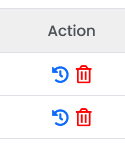
Action
Restore
Selecting this will restore the VPS to that mirror.
Delete
Selecting this will delete the VPS mirror permanently.
Select the restore action for the date and time you want to back up.
Step 5
Select Ok to initiate the backuprestore process in the background.
This can take 1-10 minutes to complete.
This will permanently delete all data on your VPS at the moment and restore all data from the date and time you selected.