
How do create a file system on my VPS's additional mount?
Step 1
Login to your VPS with an SSH tool, in this example we are using Bitvise SSH.
Once signed in, run the following command.
lsblk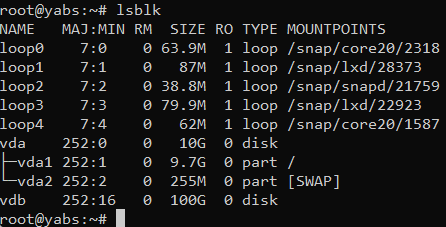
In the command, you will see two disk mounts, one is VDA which is your primary disk mount since itsit's mounted to /. Your additional disk mount is VDB with 100G in size.
/dev/sdb is our mount.
Step 2
Run the following command to create a file system on that disk.
mkfs.ext4 /dev/sdb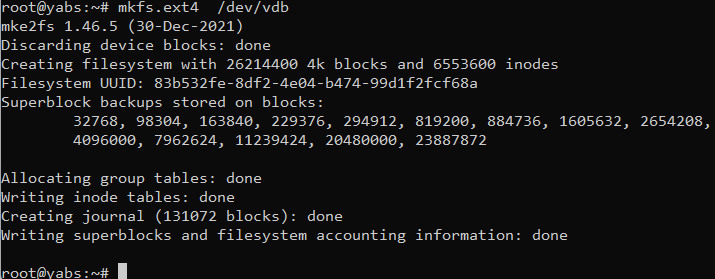
As you see now there is a file system of mkfs.ext4 created on that mount.
Run the following command.
blkid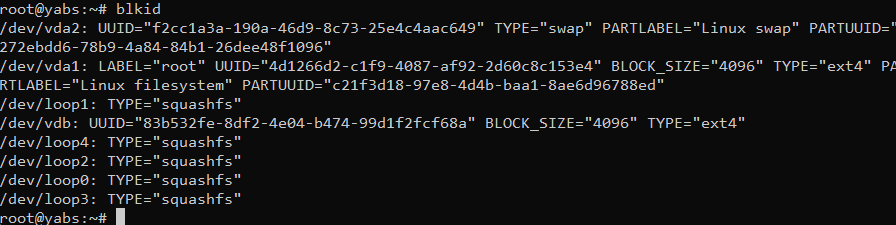
Keep a note of the UUID value of /dev/vdb.
Step 3
Run the following commands to mount the file system to the OS.
You can change the value of data to whatever you'd like.
You can change the /mnt/data folder to /mount or /data or whatever folder you'd like. This is just an example.
mkdir /mnt/data
mount -t ext4 /dev/vdb  /mnt/data
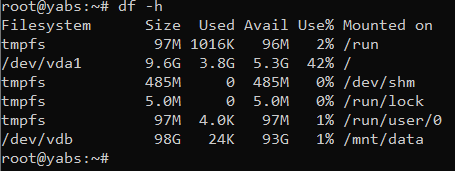
df -h
Line 1 makes the directory. Line 2 makes the mount, mounting the drive /dev/vdb to the folder /mnt/data. Line 3 returns what your system appears like with the new file system
Upon completion, you will see the new usable mount where you can store all your data now.
Step 4
Listed below are 2 VPS backups forAdd the VPSdetails of the mount we havecompleted selectedearlier above.into the FSTAB file.
nano /etc/fstab
/dev/sdb /mnt/data ext4  defaults   0 0
OnFailure theto left-hand side, it will show the date and time when the backup was created, on the right-hand side are the actions available per backup.
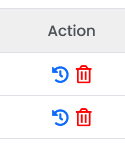
Select the restore action for the date and time you wantcomplete to back up.
Step 5
Select Ok to initiate the restore process in the background.
This can take 1-10 minutes to complete.
This will permanently delete all data on your VPS at the moment and restore all data from the date and time you selected.

this!