# How do I view the backups of my VPS?

<p class="callout warning">VPS Backups are currently only provided with High Ram KVM VPSs.</p>

##### Step 1

Sign in to the VPS panel.  
  
VPS Panel: [https://vps.aquatis.host:4083/](https://vps.aquatis.host:4083/)

[![image.png](https://knowledgebase.aquatis.host/uploads/images/gallery/2022-09/scaled-1680-/ZLT0LhA6gXVvw4g0-image.png)](https://knowledgebase.aquatis.host/uploads/images/gallery/2022-09/ZLT0LhA6gXVvw4g0-image.png)

##### Step 2  


Select the **VPS** you wish to control.

[![image.png](https://knowledgebase.aquatis.host/uploads/images/gallery/2022-09/scaled-1680-/84bDKey279b9vj5u-image.png)](https://knowledgebase.aquatis.host/uploads/images/gallery/2022-09/84bDKey279b9vj5u-image.png)

##### Step 3

On the navigation bar, select the **Backups** button to view the VPS backups.

[![image.png](https://knowledgebase.aquatis.host/uploads/images/gallery/2022-09/scaled-1680-/RXmWrwQI1pl7HDff-image.png)](https://knowledgebase.aquatis.host/uploads/images/gallery/2022-09/RXmWrwQI1pl7HDff-image.png)

Listed below will be the backups currently stored. This will show you all of the options currently available to you.

[![image.png](https://knowledgebase.aquatis.host/uploads/images/gallery/2022-09/scaled-1680-/xm8WyJKbfJBmY8Be-image.png)](https://knowledgebase.aquatis.host/uploads/images/gallery/2022-09/xm8WyJKbfJBmY8Be-image.png)
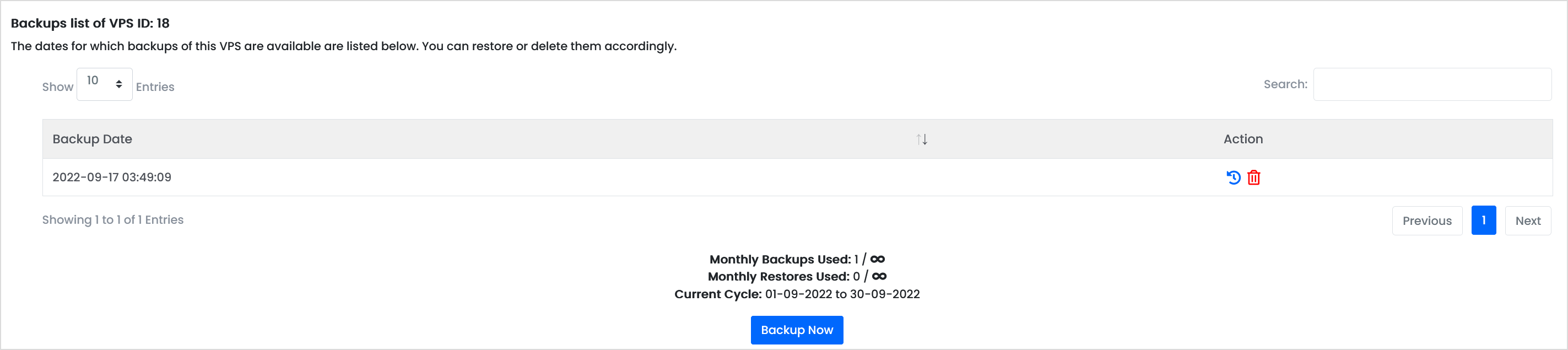
Listed in the table will be all the backups that are currently stored. Below are two actions.

[![image.png](https://knowledgebase.aquatis.host/uploads/images/gallery/2022-09/scaled-1680-/HOGNxIqkdVAHKv77-image.png)](https://knowledgebase.aquatis.host/uploads/images/gallery/2022-09/HOGNxIqkdVAHKv77-image.png)

<table border="1" id="bkmrk-action-action-defini" style="border-collapse: collapse; width: 100%;"><colgroup><col style="width: 9.76652%;"></col><col style="width: 90.2335%;"></col></colgroup><tbody><tr><td class="align-center">**Action**</td><td>**Action Definition**   
</td></tr><tr><td class="align-center"><span style="color: rgb(53, 152, 219);">**Restore**</span>  
</td><td>Selecting this will restore this backup to the VPS. This will delete data on the VPS.  
</td></tr><tr><td class="align-center">**<span style="color: rgb(224, 62, 45);">Delete</span>**  
</td><td>This will delete the backup from the system, doing this will be unrecoverable.</td></tr></tbody></table>

##### Step 4  


To create a manual backup, **select** "Backup Now" to manually backup your VPS.

[![image.png](https://knowledgebase.aquatis.host/uploads/images/gallery/2022-09/scaled-1680-/R9K7VPfvaDOvv0f6-image.png)](https://knowledgebase.aquatis.host/uploads/images/gallery/2022-09/R9K7VPfvaDOvv0f6-image.png)