# How do create a file system on my VPS's additional mount?
##### Step 1
Login to your VPS with an SSH tool, in this example we are using [Bitvise SSH](https://www.bitvise.com/ssh-client-download).
Once signed in, run the following command.
```bash
lsblk
```
[](https://knowledgebase.aquatis.host/uploads/images/gallery/2024-06/gEckm55NRRfbn9j3-image.png)
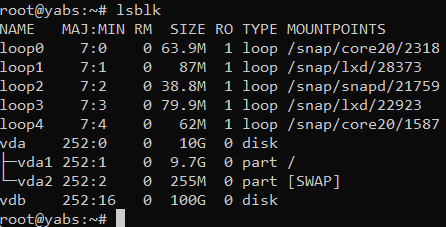
In the command, you will see two disk mounts, one is VDA which is your primary disk mount since it's mounted to /. Your additional disk mount is VDB with 100G in size.
**/dev/vdb** is our mount.
##### Step 2
Run the following command to create a file system on that disk.
```bash
mkfs.ext4 /dev/vdb
```
[](https://knowledgebase.aquatis.host/uploads/images/gallery/2024-06/t0zK8yzc4qBVDKYu-image.png)
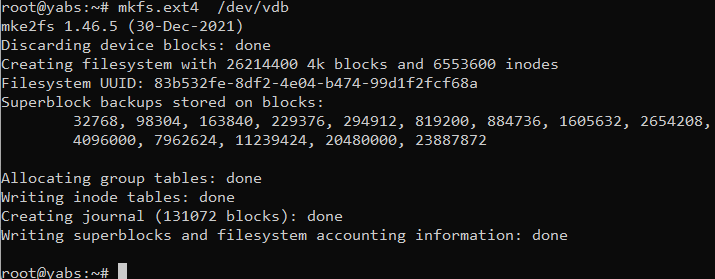
As you see now there is a file system of mkfs.ext4 created on that mount.
##### Step 3
Run the following commands to mount the file system to the OS. You can change the value of data to whatever you'd like.
You can change the /mnt/data folder to /mount or /data or whatever folder you'd like. This is just an example.
```bash
mkdir /mnt/data
mount -t ext4 /dev/vdb /mnt/data
df -h
```
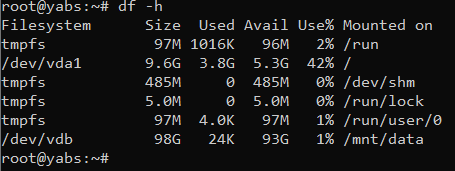
Line 1 makes the directory. Line 2 makes the mount, mounting the drive /dev/vdb to the folder /mnt/data. Line 3 returns what your system appears like with the new file system
Upon completion, you will see the new usable mount where you can store all your data now.
[](https://knowledgebase.aquatis.host/uploads/images/gallery/2024-06/6zkpiinq5x0eCvv1-image.png)
##### Step 4
Add the details of the mount we completed earlier into the FSTAB file.
```bash
nano /etc/fstab
/dev/vdb /mnt/data ext4 defaults 0 0
```
After that, if you restart your server the file system will remain on there.
Failure to do this will cause your file system to umount during system reboots. Its recommend that you complete this!
That's it! You now fully know how to create a file system on your VPS's new mount.